Explore
العربيةGet Beauté

The Beauté app

Your Beauté world, in one app.

Discover services, book your way, review the total and pay—then follow everything from one place.

At a glance

  • At-home services for women
  • A chosen appointment or Express Order
  • Booking and payment in the app
  • Final coverage is confirmed by address in the app

Book your way

Your day. Your way.

Plan your moment, or request a service now. Every booking step happens in the app.

Illustrative app screens with private details hidden. Shown dates are examples, not live availability.

Have a time in mind?

A little time, set aside for you.

  1. Start with your service

    Choose appointment booking on the home screen, then the service you need.

    Check the service address
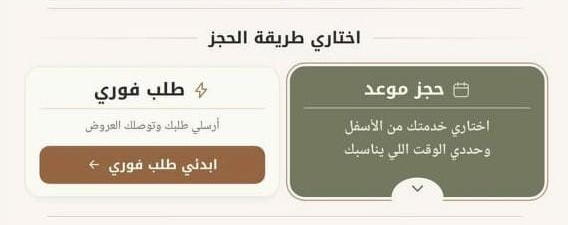
    Arabic app controls for an appointment or Express Order
    Arabic app example Enlarge screen

    Arabic app controls for an appointment or Express Order

    Illustrative screen; private details are hidden and dates do not show live availability.

    Arabic app controls for an appointment or Express Order
  2. Choose a time, then a professional

    Select your day and time, then compare the professionals shown for that appointment. Open the service details before adding it to your basket.

    How do I choose a professional?
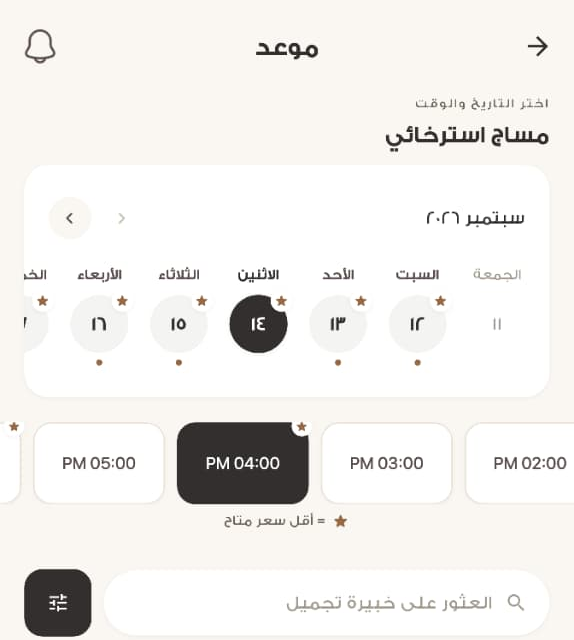
    The Arabic date and time picker, before choosing a professional
    Arabic app example Enlarge screen

    The Arabic date and time picker, before choosing a professional

    Illustrative screen; private details are hidden and dates do not show live availability.

    The Arabic date and time picker, before choosing a professional
  3. Review, then confirm

    Review the basket summary and service terms. Then check the order address, status, total and payment method before completing it in the app.

    Check before confirming
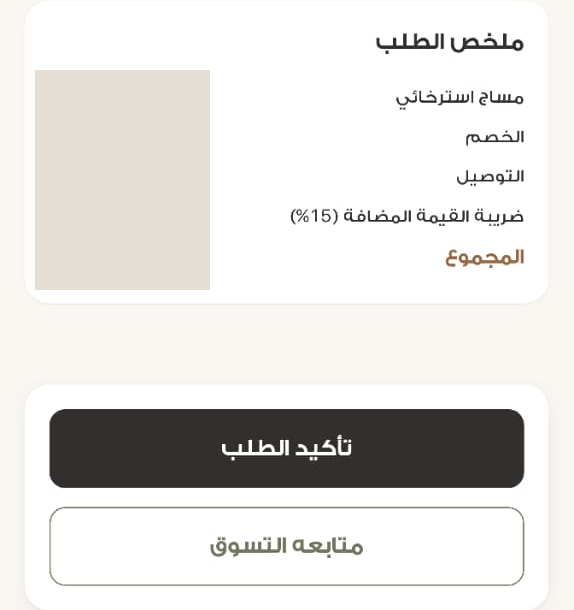
    The basket summary and confirm-order control, with amounts hidden
    Arabic app example Enlarge screen

    The basket summary and confirm-order control, with amounts hidden

    Illustrative screen; private details are hidden and dates do not show live availability.

    The basket summary and confirm-order control, with amounts hidden

Need a service now?

Express Order, for when you are in a hurry.

  1. Prepare your request

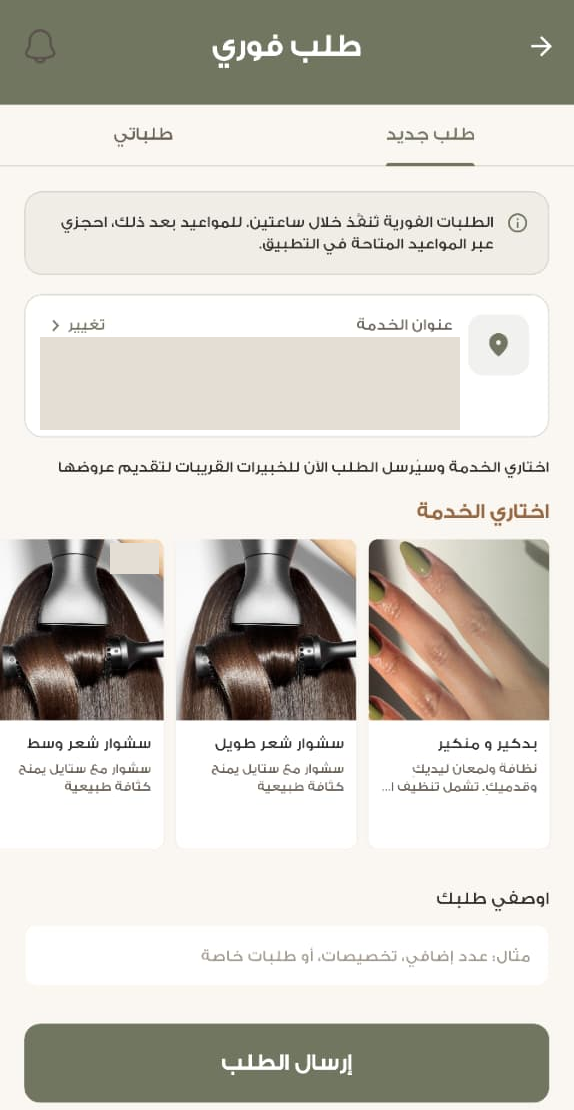
    Choose Express Order on the home screen. Check the service address, select your service and add a description if needed. Review the confirmation before sending.

    Check the service address
    Express service selection, description and send-request control; address and example promotion hidden
    Arabic app example Enlarge screen

    Express service selection, description and send-request control; address and example promotion hidden

    Illustrative screen; private details are hidden and dates do not show live availability.

    Express service selection, description and send-request control; address and example promotion hidden
  2. Review the responses

    Open your request to see offers. When an offer arrives, review the professional, service and quoted price before choosing to accept and pay.

    Help with offers
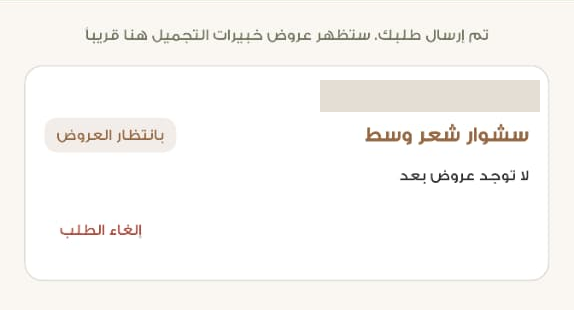
    The waiting-for-offers state, with the example request time hidden
    Arabic app example Enlarge screen

    The waiting-for-offers state, with the example request time hidden

    Illustrative screen; private details are hidden and dates do not show live availability.

    The waiting-for-offers state, with the example request time hidden
  3. Choose and confirm

    Review availability, details and the total in the app before confirming. Availability and arrival times vary.

    Check before confirming
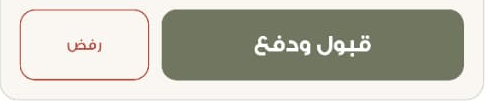
    Accept and pay or decline controls in a received Express offer
    Arabic app example Enlarge screen

    Accept and pay or decline controls in a received Express offer

    Illustrative screen; private details are hidden and dates do not show live availability.

    Accept and pay or decline controls in a received Express offer

Follow your request progress

  1. Request
  2. Offers
  3. Acceptance
  4. Payment

Review the offer and its details before accepting, then check the total before payment.

Before you confirm

Take a moment with the details.

  • Your address and time

    Review your address and chosen appointment, or the arrival time proposed in an Express Order response.

  • Your service details

    Check the service, professional, duration and additions you have selected.

  • Your total before payment

    Review the final total shown in the app and the booking terms before confirming.

You sent an Express Order. What next?

Waiting for offers

If the app says there are no offers yet, return to the request to check its status. Sending a request does not confirm a booking or guarantee an offer.

An offer has arrived

Review the offer before accepting and paying. The offer screen includes a decline option, and the request includes cancellation; check the terms shown before deciding.

Prefer another time?

The Express confirmation includes an option to schedule the service for another time. Use appointment booking when you want to choose from available slots.

See the appointment steps

Start with what you need

A little help, whenever you need it.

Find your way around

A little help with your next step.

Choose a question for the steps. Account changes and bookings happen inside the Beauté app.

How do I choose a professional?

Path in the Arabic appبيوتي ← ملف المختصة ← التقييمات

Search for a professional or browse by speciality. Open her profile to read her introduction and specialities, then open reviews. You can sort the reviews or show those with a written comment.

A rating on a professional’s profile belongs to that professional; it is not an overall app rating.

Continue in the app
Where can I check my booking?

Path in the Arabic appطلباتي

Open your order to check its status, service, date, time, address and professional details. If the status asks for payment to confirm the order, review the summary before continuing.

An order appearing in the app does not by itself mean payment is complete. Follow the status shown in the app.

Continue in the app
How do I check the service address?

Path in the Arabic appالمزيد ← العناوين

Open Addresses to add an address or edit a saved one. For an Express Order, check the service address and use the change option before sending your request.

Check the address on the order itself before confirming, especially if you have several saved addresses.

Continue in the app
I would like to send a beauty gift

Path in the Arabic appالهدايا ← أرسل هدية

Open Gifts and choose Send a gift, then select a package, design your card and review the details in the app. Use My gifts to return to your gifts.

Use the packages and details shown in the app when making your choice.

Continue in the app
Where are language and notifications?

Path in the Arabic appالمزيد ← إعدادات

Language and notification settings are in More. You can also reach the terms and privacy policy from the same page.

Check your device settings too if notifications are not appearing.

Continue in the app
I need help with a question or problem

Path in the Arabic appالمزيد ← تواصل معنا

Open Contact us in the information section. Complaints and enquiries are also listed under your activity in More. You can use the website’s support options as well.

Choose the support channel that suits you. Do not share payment details or verification codes.

Contact and support options
Not sure whether payment went through?

Path in the Arabic appطلباتي

Return to the order details and read the status and total shown. If the status is still unclear, contact support before trying to pay again.

This guide cannot see your payment status. Do not send card details or verification codes to support.

Contact and support options
I sent an Express Order but have no offer

Path in the Arabic appالطلب الفوري ← العروض

Open the request to check its offers and current status. If there are no offers yet, do not treat it as a confirmed booking. You can review appointment booking if you prefer another time.

Sending a request does not guarantee an offer or a particular arrival time.

See appointment booking
I need to cancel or ask about a refund

Path in the Arabic appطلباتي

Review your order details and the cancellation and refund policy before taking action. Ask support if you are unsure how the terms apply to your order.

Refund eligibility depends on the order terms; this guide cannot confirm it.

Read the cancellation and refund policy
Where can I find my gifts?

Path in the Arabic appالهدايا ← هداياي

Open Gifts, then My gifts to return to your gifts. To send a new one, go back to Send a gift and review the card and package options.

Review the details in the app before continuing, and contact support if you need help.

How to send a gift

Ready for your next step?

Continue on your phone.

Book, review your orders and pay in the Beauté app. Choose the option that suits you.

Already have the app?

Open Beauté, then follow the guide. If the link takes you to the store, you can open the app directly on your phone.

Open Beauté

New to Beauté?

Choose App Store for iPhone or Google Play for Android.

Download on the App StoreGet it on Google Play

Browsing on a computer? Open this page on your phone and choose its store.

Need help with the app?

Before you begin.

How do I book?

Inside the Beauté app: choose an appointment or send an Express Order, then review the total before payment.

Can I book on the website?

No. The website helps you discover and decide; booking and payment happen in the app.

BEAUTÉ

Everything after discovery, in the app.

The app shows current options, appointment times and the final total for your address.